

good fence
I just picked this fence up last week and I tried it out in my backyard. I have4 acres and the range was great. I don't have to worry that my dogs are running wild and bothering my neihbors.
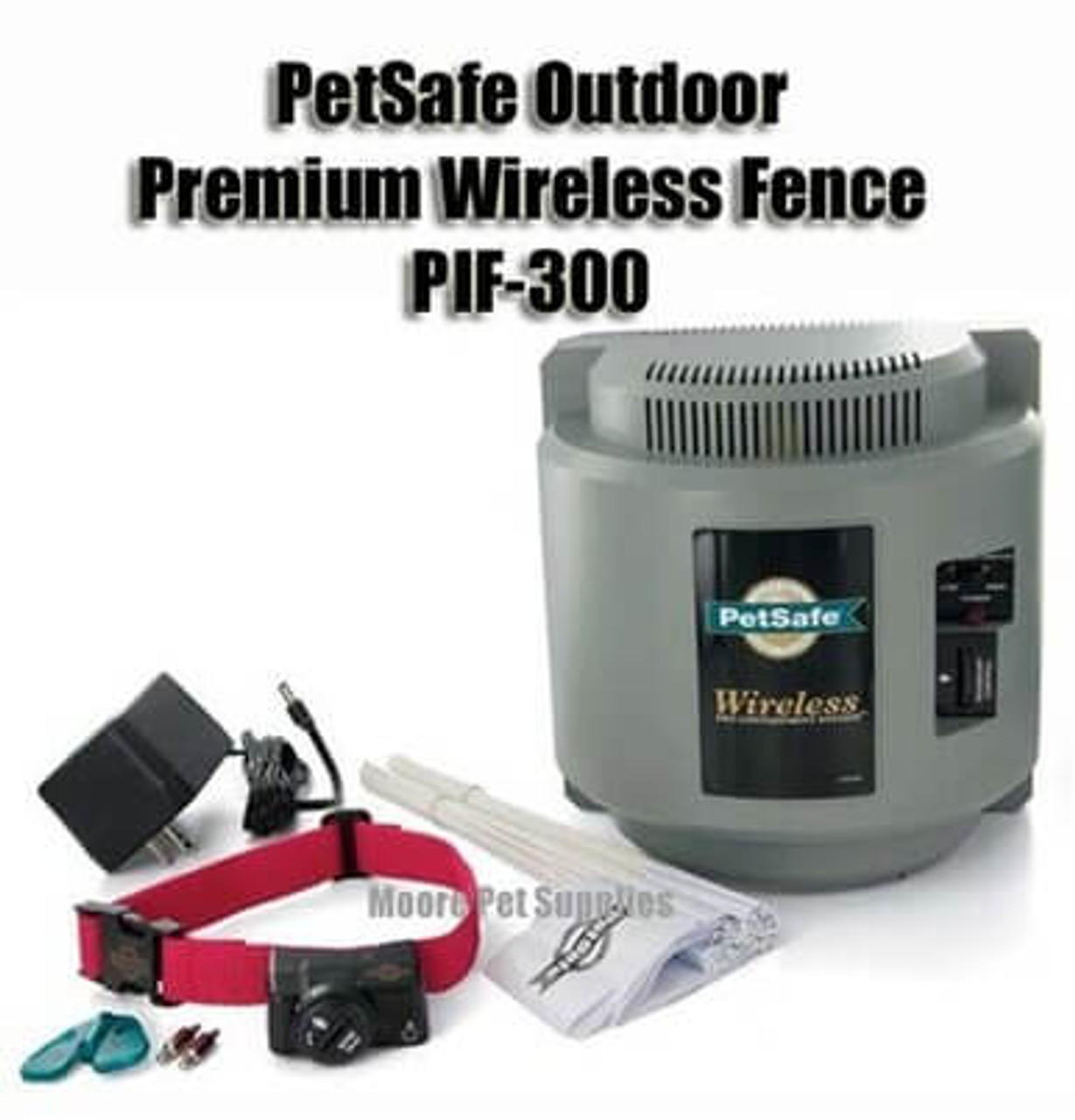


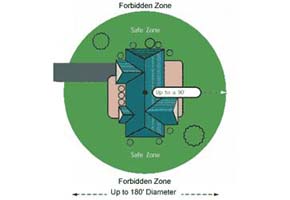
The PetSafe PIF-300 Premium Wireless Fence Covers an adjustable circular area of up to 1/2 acre (180 feet diameter). The unit is completely portable, no wire to bury. There are 5 adjustable levels of correction plus beep-only mode. Run through protection keeps your pet where you decide. Easy set-up, manual included.
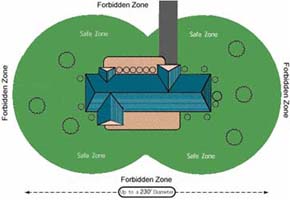
Note: You may add multiple dogs on this system using the PetSafe PIF-275-19 Extra Collar Receivers. You may also increase the area of containment by adding additional PetSafe IF-100 Transmitters.
|
Outdoor Premium Wireless Fence - Accessories Can be added when on Check Out Page |
|||
|
PIF-275-19 Receiver Collar
 Additional receiver collars can be added to expand your containment system. There is no limit to the number of collars that can be added. |
IF-100 Extra Transmitter
 Extra transmitters can be added to expand your coverage area. They are also handy for traveling or temporary situations. |
RFA-67 6-Volt
Battery  The RFA-67 6-volt lithium battery is used to power the receiver collar for the PIF-300 wireless containment system. |
RFA-58 Power
Inverter 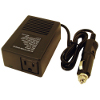 Plugs directly into your car's cigarette lighter, allowing you to take the PIF-300 containment system along with you while traveling. |


Other Items You May Need
• Pliers
• Scissors
• Lighter
• Drill & mounting hardware
• Tape measure
• Non-metallic collar and leash
How the System Works
The PetSafe Wireless Pet Containment SystemTM has been proven safe, comfortable, and effective for all pets over 8
pounds. The system works by transmitting a radio signal up to 90 feet in all directions. You temporarily defi ne the Pet
Area with Boundary Flags for a visual aid in training your pet. Your pet wears a Receiver Collar with Contact Points that
touch his neck, and, once trained, is allowed to roam freely in the Pet Area. When your pet reaches the Boundary Zone,
the Receiver Collar gives a warning beep before delivering a safe Static Correction through the Contact Points to get his
attention until he returns to the Pet Area.
Key Definitions
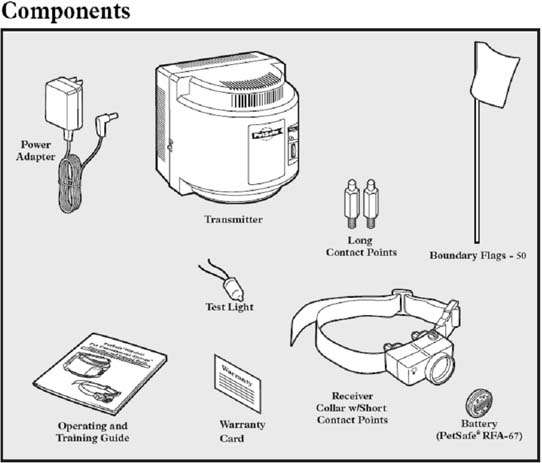
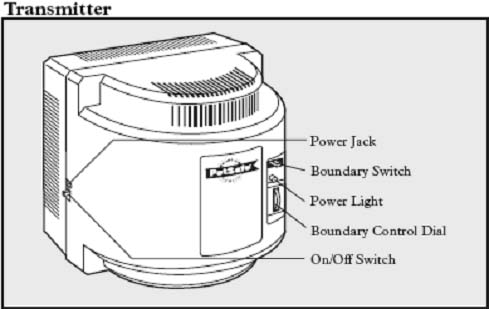
Transmitter: Transmits the radio signal and is the center
of the Pet Area.
Pet Area: Distance from the Transmitter where your pet
can roam freely.
Boundary Zone: 2 to 3 foot wide area outside the
Pet Area where your pet’s Receiver Collar will begin to
beep and then begin to deliver a Static Correction. The
correction will start in the Boundary Zone and continue
anywhere beyond the Pet Area. Note: The Receiver Collar is
equipped with a safety time-out feature that will stop correcting
after 30 seconds if your pet remains outside the Pet Area.
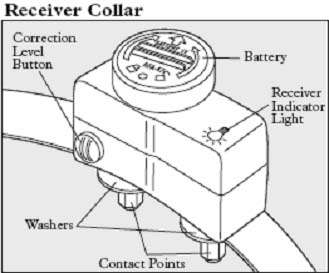
Receiver Collar: Receives the radio signal from the
Transmitter.
Correction Level Button: Adjusts the level of Static
Correction your pet receives outside the Pet Area.
Receiver Indicator Light: Indicates the level of
correction at which the Receiver Collar is set. This light
also serves as a low battery indicator.
Contact Points: Deliver the safe Static Correction when
your pet moves into the Boundary Zone.
Power Jack: Where the Power Adapter plugs into the
Transmitter. The Transmitter is powered by a standard
120-volt outlet.
Boundary Switch: Adjust according to the size of the Pet
Area desired.
Power Light: Indicates when the Transmitter is on.
Boundary Control Dial: Adjusts the distance from the
Transmitter to the Boundary Zone. Note: Adjusting the dial
does not change the level of Static Correction on the Receiver
Collar.
Set Up the Transmitter
Important: You may need to move the Transmitter several times before determining the final location.
The Transmitter is located at the exact center of the Pet Area. Place the Transmitter:
• 2 to 4 feet above the floor.
• In a dry, well ventilated, protected area.
• In an area where temperatures do not fall below freezing (e.g., garage, basement, shed, closet).
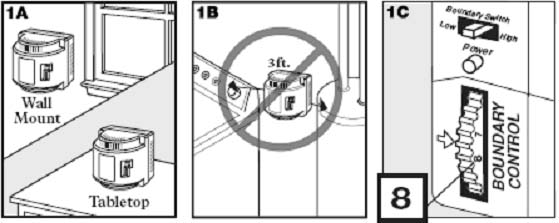
• On a non-metal table or mount on a wall (1A). A mounting template is included on the back of this guide.
• At least 3 feet from large metal objects, as these items may reduce the size and shape of your Pet Area (1B).
To maximize your Pet Area, make
sure the Boundary Switch is on
“High” and the Boundary Control
Dial is set to “8” (1C). Plug Power
Adapter into Power Jack and standard
120-volt outlet. Turn the Transmitter
on.
Prepare the Receiver Collar
Your Receiver Collar comes with short Contact Points installed. Use the long Contact Points for pets with long
or thick hair. Tighten the Contact Points with pliers one-half turn beyond finger tight (2A). Check the tightness
weekly.
To Insert and Remove the Battery
Note: Do not install the battery while the Receiver Collar is on your pet.
This Receiver Collar utilizes a replaceable PetSafe® battery (RFA-67). This unique battery is designed to make battery
replacement easier and increase water protection.
To insert the battery, align the symbols on the battery (arrow) and Receiver Collar (triangle) (2B). Use a large coin
to turn the battery clockwise until the arrow lines up with the lock symbol on the housing (2C) .
To remove the battery, turn the battery counter-clockwise using a large coin (2D, 2E). DO NOT attempt to cut
into or pry open the battery. Be sure to discard the used battery properly.
A replacement PetSafe® battery (RFA-67) can be found at many retailers. Contact the Customer Care Center at
1-800-732-2677 or visit our web site at www.petsafe.net to locate a retailer near you.

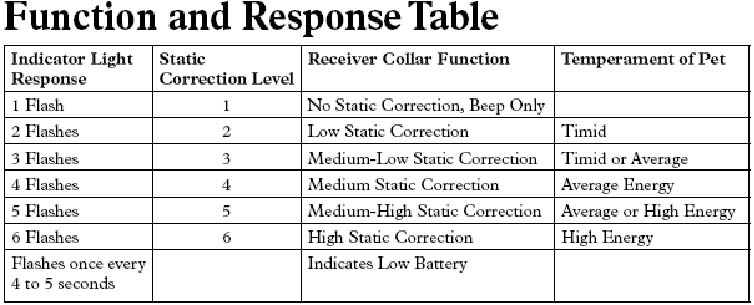
To Set the Static Correction Level
Note: Your receiver collar has been factory-set to Beep Only.
Read all steps before attempting to set the
Static Correction Level.
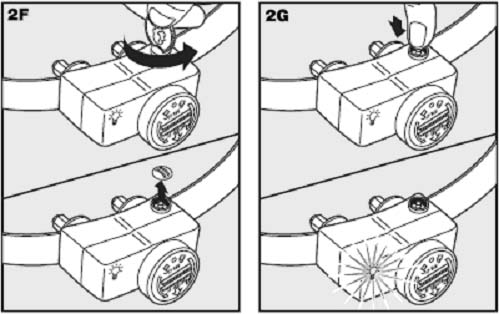
1. Remove the clear plastic cover with a coin
to expose the Correction Level Button (2F).
2. With the battery installed, press the
Correction Level Button and release when
the Receiver LED Indicator Light lights up
(2G).
3. The Receiver LED Indicator Light will
emit a series of fl ashes representing the
Static Correction Level.
4. Increase the Static Correction Level by
pressing and releasing the Correction Level
Button within 5 seconds of the previous
series of fl ashes.
5. After setting the Static Correction Level,
replace the cover to protect the Correction Level Button.
The Static Correction levels increase in strength from 1 to 6. Pushing the Correction Level Button while the
Receiver Collar is on level 6 will cause the Receiver Collar to revert to level 1. Refer to the Function and Response
Table to choose the Static Correction level that best fi ts your pet.
The Receiver LED Indicator Light acts as a low battery indicator, flashing every 4 to 5 seconds when replacement
is required.
Adjust the Pet Area to Desired Size
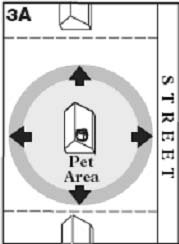
Make sure the entire Pet Area lies within your property boundaries (3A). Always start
determining the Boundary Zone at the shortest distance from Transmitter. Place the
Boundary Switch on “Low” if the Boundary Zone will be less than 45 feet from the
Transmitter.
Two-Person Method
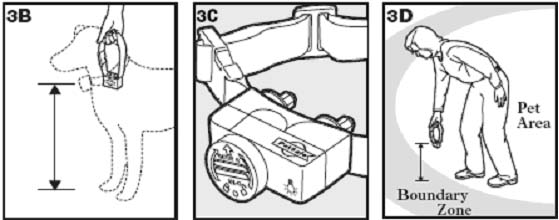
Hold the Receiver Collar at your pet’s neck height (3B) with logo side facing away from
the Transmitter (3C). Walk to the edge of the desired Pet Area. Facing away from the
Transmitter, hold the Receiver Collar at the edge of the desired Pet Area (3D).
Starting with the Boundary Control Dial set to “8”, have a second person turn the dial
down SLOWLY. When the Receiver Collar starts to beep, tell the person to stop turning
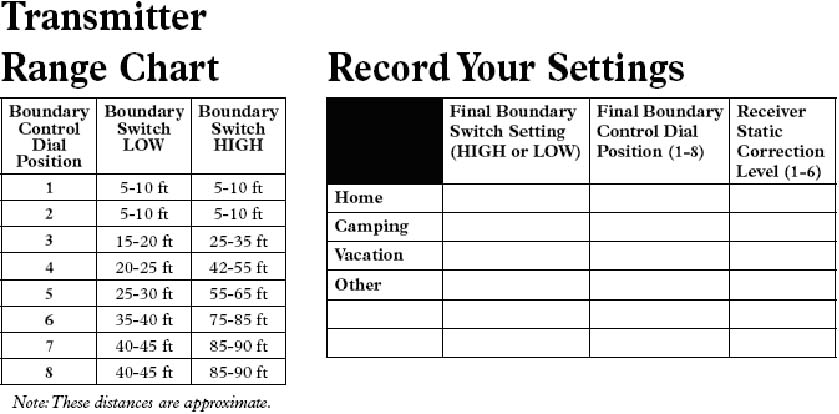
the Boundary Control Dial. Record your settings below for future reference.
One-Person Method
Measure the shortest distance from
the desired Boundary Zone to the
Transmitter. Find the distance on
the Transmitter Range Chart below
and set the Boundary Switch and
Boundary Control Dial. Take the
Receiver Collar to the Boundary Zone
with the Receiver Collar at your pet’s
neck height (3B) with logo side facing
away from the Transmitter (3C).
Determine where the Receiver Collar
begins to beep. If the Receiver Collar beeps before or after the desired Boundary Zone, return to the Transmitter
and adjust the Boundary Control Dial. Repeat this process until the Receiver Collar is beeping at the desired
location. Record your settings below for future reference.
Note: If you cannot hear the beep, refer to the “Test Light Instructions” section.
Place the Boundary Flags
The Boundary Flags are visual reminders for your pet of where
the Boundary Zone is located. The Receiver Collar will activate
within 2 to 3 feet of the Boundary Flags.
1. Hold the Receiver Collar at your pet’s neck height with logo
side facing away from the Transmitter.
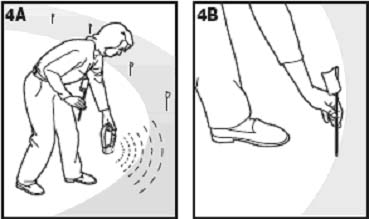
2. Walk towards the Boundary Zone until the Receiver Collar
beeps (4A).
3. Place a Boundary Flag in the ground (4B).
4. Walk back into the Pet Area until the beeping stops.
5. Repeat this process around the Boundary Zone until it is
marked with Boundary Flags every 10 feet.
The Boundary Flags may be in different parts of the Boundary
Zone and may not be in a line. The Boundary Zone is 2 to 3 feet wide.
Note: If you cannot hear the beep, refer to the “Test Light Instructions” section.
Fit the Receiver Collar
Important: The proper fit and placement of your Receiver Collar is important for effective training. The Contact
Points must have direct contact with your pet’s skin on the underside of his neck.
To assure a proper fit, please follow these steps:
1. Make sure that the battery is not installed in the Receiver Collar.
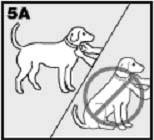
2. Start with your pet standing comfortably (5A).
3. To make it easier to hear the warning beep, place the Receiver Collar on your pet with
the logo side of Receiver facing up.
4. Center the Contact Points underneath your pet’s neck, touching the skin. If your pet has a
long or thick coat, use the enclosed long Contact Points to reach
through the hair. Note: It is sometimes necessary to trim the hair
around the Contact Points to make sure that contact is consistent.
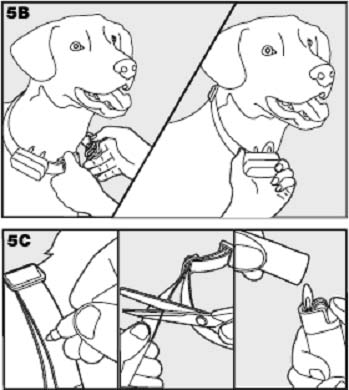
5. Check the tightness of the Receiver Collar by inserting one
finger between the end of a Contact Point and your pet’s neck.
The fit should be snug but not constricting (5B).
6. Allow your pet to wear the collar for several minutes then
recheck the fit. Check the fit again as your pet becomes more
comfortable with the Receiver Collar.
7. Trim the collar as follows (5C):
a. Mark the desired length of the Receiver Collar with a pen. Allow
for growth if your pet is young or grows a thick winter coat.
b. Remove the Receiver Collar from your pet and cut off the excess.
c. Before placing the Receiver Collar back onto your pet, seal the
edge of the cut collar by applying a flame along the frayed edge.
Important: For comfort, safety and effectiveness of product,
please ensure the following:
• During the fi rst 2 weeks of training, do not use the training
device on your pet without direct supervision.
• Check the fi t to prevent excessive pressure by being able to
insert one fi nger between the Contact Point and your pet’s skin.
• Your pet must be carefully examined daily for any signs of a rash or sore.
• If a rash or sore is observed, discontinue the use of the Receiver Collar for a few days.
• If the condition persists beyond 48 hours, see your veterinarian.
• Your pet’s neck and the Contact Points must be washed weekly with a wash cloth and mild hand soap,
then rinsed thoroughly.
A condition called Pressure Necrosis, which is a devitalization of the skin due to excessive and
prolonged contact against the Contact Points, may occur if the steps above are not followed.
To Re-Thread the Collar
The slide buckle prevents the collar from becoming loose around
your pet’s neck.
The ridges must be facing up; the collar will slip if it is not properly
threaded.
Be Patient With Your Pet
Important: Proper training of your pet is essential to the success of the PetSafe Wireless Pet
Containment System™. Read this section completely before beginning to train your pet. Remember that
the PetSafe Wireless Pet Containment System™ is not a solid barrier.
• Have fun with your pet throughout the training process. Training should be fun,
fair, firm and consistent.
• Train for 10 to 15 minutes at a time. Don’t try to do too much too quickly. Morefrequent
short sessions are better than less-frequent longer sessions.
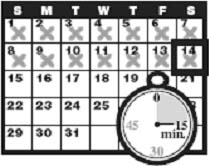
• We suggest a minimum of 14 days of training. Depending on your pet and how he
learns, the training could take more or less time.
• If your pet shows signs of stress, slow down the training schedule, add additional days
of training, or increase the amount of play time with your pet in the Pet Area. Common stress signals include:
- Pet pulling on leash toward the house
- Ears tucked
- Tail down
- Body lowered
- Nervous / frantic movement or stiffening of pet’s body
• Your pet must be completely comfortable near the Boundary Flags at the end of every training session. Spend at
least 5 minutes of “play time” at the completion of each session within 10 feet of the Boundary Flags.
• Finish each training session on a positive note with lots of praise and play.
• Remove the Receiver Collar after each training session.
• Be sure to contain your pet by another means during the training period (e.g. pen, tie-out, leash, etc.).
• During training, if you need to take your pet out of the Pet Area, remove the Receiver Collar and either pick
your pet up or put him in the car to pass out of the Pet Area.
• Even if you think your pet is responding well to the training, complete the entire training. Reinforcement is important!
Day 1 - Boundary Flag Awareness
Perform three sessions on day 1, each training session lasting 10-15 minutes.
Goal:
To have your pet learn that the Boundary Flags and warning beep from the Receiver Collar defi ne the new Pet Area.
Setup:
• Program the Static Correction Level on the Receiver Collar depending on the size and temperament of your pet.
• Put a separate non-metallic collar on your pet’s neck ABOVE the Receiver Collar and attach a leash. Note: Be sure
the extra collar does not put pressure on the Contact Points.
• Have tiny pieces of treats that your pet will fi nd desirable available (hot dogs or lunch meat work well).
• Have your pet’s favorite play toy available.
Steps:
1. Begin by walking your pet on a leash in the Pet Area. Calmly praise and talk to your pet, occasionally giving
treats.
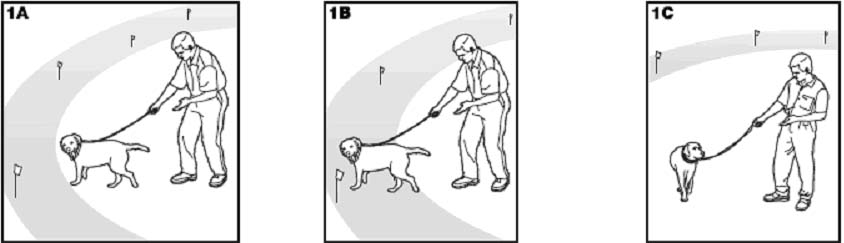
2. Move toward the Boundary Flags (1A). Keep your mood happy and throw treats to the ground.
3. With full control of your pet on a leash, toss a treat on the outside edge of the fl ags. As your pet enters the Boundary
Zone to receive the treat, the receiver collar will begin to beep (1B). As your pet remains in the Boundary Zone, he will
receive a mild Static Correction. Allow your pet to stay in the Boundary Zone for 2 seconds then gently help him back
into the Pet Area (1C). Immediately praise and offer your pet a treat as he enters the Pet Area, even if you have helped
with the leash. Wiggle a Boundary Flag to help your pet understand that the discomfort of the Static Correction happens
around the fl ags.
4. Repeat this process at several different Boundary Flags. Your pet should start to resist going after the treat in the
Boundary Zone. If your pet continues to enter the Boundary Zone, check the fi t of his Receiver Collar and allow
him 2-3 seconds in the zone before pulling him back to the Pet Area.
Note: Never allow your pet to eat the treat in the Boundary Zone.
Days 2 thru 4 - Continue Boundary Flag Awareness
Perform three sessions per day, each lasting 10-15 minutes.
Goal:
To train your pet to stay in the Pet Area and respect the boundary while you are outside of it.
Setup:
• Program the Static Correction Level on the Receiver Collar depending on the size and temperament of your pet.
• Put a separate non-metallic collar on your pet’s neck ABOVE the Receiver Collar and attach a leash. Note: Be sure
the extra collar does not put pressure on the Contact Points.
• Have tiny pieces of treats available (hot dogs or lunch meat work well).
• Have your pet’s favorite play toy available.
Steps:
1. Repeat steps 1-4 in Phase One
2. Drop the leash, leaving your pet in the Pet Area.
3. Walk outside the boundary and wiggle the Boundary Flags facing your pet.
4. Continue around the entire boundary doing this, tossing treats to your pet in the Pet Area and praising him.
5. If your pet does not respond to the Static Correction, increase the Static Correction Level by 1.
Days 5 thru 8 - Distraction Phase
Perform three training sessions per day, each lasting 10 to 15 minutes.
Goal:
To train your pet to stay within the Pet Area with distractions outside of the Pet Area.
Setup:
• Program the Static Correction Level on the Receiver Collar depending on the size and temperament of your pet.
• Put a separate non-metallic collar on your pet’s neck ABOVE the Receiver Collar and attach a leash. Note: Be sure
the extra collar does not put pressure on the Contact Points.
• Have tiny pieces of treats available (hot dogs or lunch meat work well).
• Have your pet’s favorite play toy available.
• Create distractions to tempt your pet to enter the Boundary Zone, such as:
- Have a family member cross from inside the Pet Area to outside of it.
- Throw a ball outside of the Pet Area.
- Have a neighbor walk their pet outside of the Pet Area.
Steps:
1. With full control of your pet on a leash, have the distraction presented.
2. If your pet does not move toward the distraction, praise and offer a treat.
3. If your pet does react to the distraction, allow him to go into the Boundary Zone.

This extra receiver collar can be used to add another dog or as a replacement collar to the Wireless Fence Containment System (PIF-300). Add an unlimited number of pets to your system. This collar...

PetSafe Stay + Play Wireless Fence PIF00-12918 The PetSafe PIF00-12918 Stay + Play Wireless Fence is the latest and greatest wireless containment system offered b

PetSafe PIF-275-19 Extra Collar Receiver PetSafe PIF-275-19 Receiver Collar is for use with the

IF-100 Wireless Pet Fence Transmitter The IF-100 Wireless Pet Fence Transmitter is the main transmitter component of the

Little dogs rejoice! We’ve catered Elite Little Dog In-Ground Fence for your petite pal’s safety. It starts with PetSafe’s smallest waterproof receiver collar, specially designed for greater comfort..…